
Use Environment Variables
You may want to allow users to use environment variables set via the Environment page in your Caido plugin.
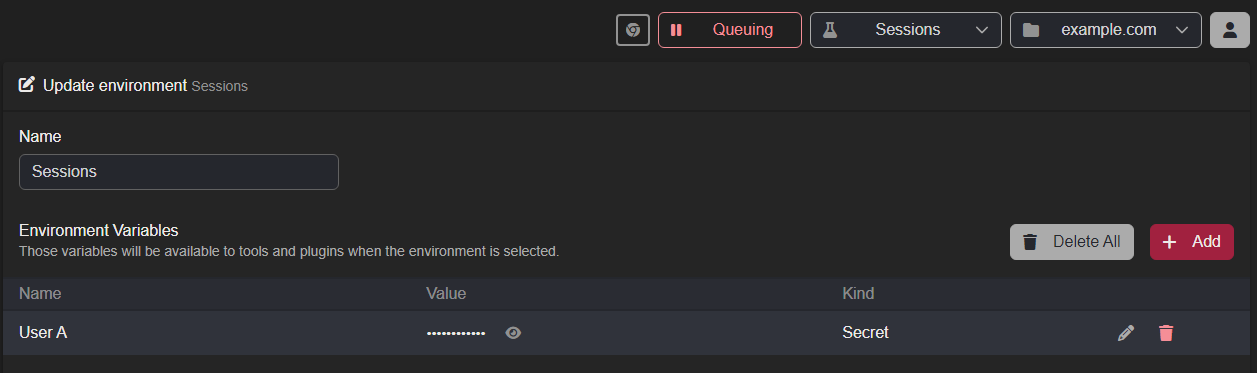
Getting the Value: Frontend Call to Backend Function
To securely access environment variables in Caido, the sdk.env.getVar() method can be used:
/packages/backend/src/index.ts
ts
import type { DefineAPI, SDK } from "caido:plugin";

export type API = DefineAPI<{
  getSession: () => Promise<string | undefined>;
}>;

export function init(sdk: SDK<API>) {
  // Register an API endpoint that frontend can call.
  sdk.api.register("getSession", async () => {
    return sdk.env.getVar("User A");
  });
}
/packages/frontend/src/index.ts
ts
const button = document.createElement("button");
button.textContent = "Check for Env Variable";
button.classList.add("bg-blue-500", "text-white", "p-2", "rounded");
button.addEventListener("click", async () => {
  const apiKey = await sdk.backend.getSession();
  // Display the message as text.
  statusText.textContent = apiKey ? "SESSION FOUND" : "NO SESSION SET";
});
Getting the Value: Frontend Call
The method is also available to the frontend directly.
/packages/frontend/src/index.ts
ts
const button = document.createElement("button");
button.textContent = "Check for Env Variable";
button.classList.add("bg-blue-500", "text-white", "p-2", "rounded");
button.addEventListener("click", () => {
  const value = sdk.env.getVar("User A");
  statusText.textContent = value ? "SESSION FOUND" : "NO SESSION SET";
  });
The Result

